
Use thoughtful comments to attract new leads, fast.

You know your buyers are on LinkedIn. But showing up every day is a full-time job you don’t have.
So you scroll finding posts, drop a few comments, and pray. Most days, nothing sticks.
Cold DMs get ignored. Robotic AI comments make you look bad.
GrowReach comments in your voice and turns real conversations into warm leads.
Comments so human, even AI Gurus can’t tell you didn’t write them
Every lead gets a Heat Score, so you talk to the ready ones first.
⚡ Ready to let leads come to you instead of chasing them?
Get GrowReach Now — Pay Once, Use Forever!
5 different data points used to build your strategy means no two users sound the same.
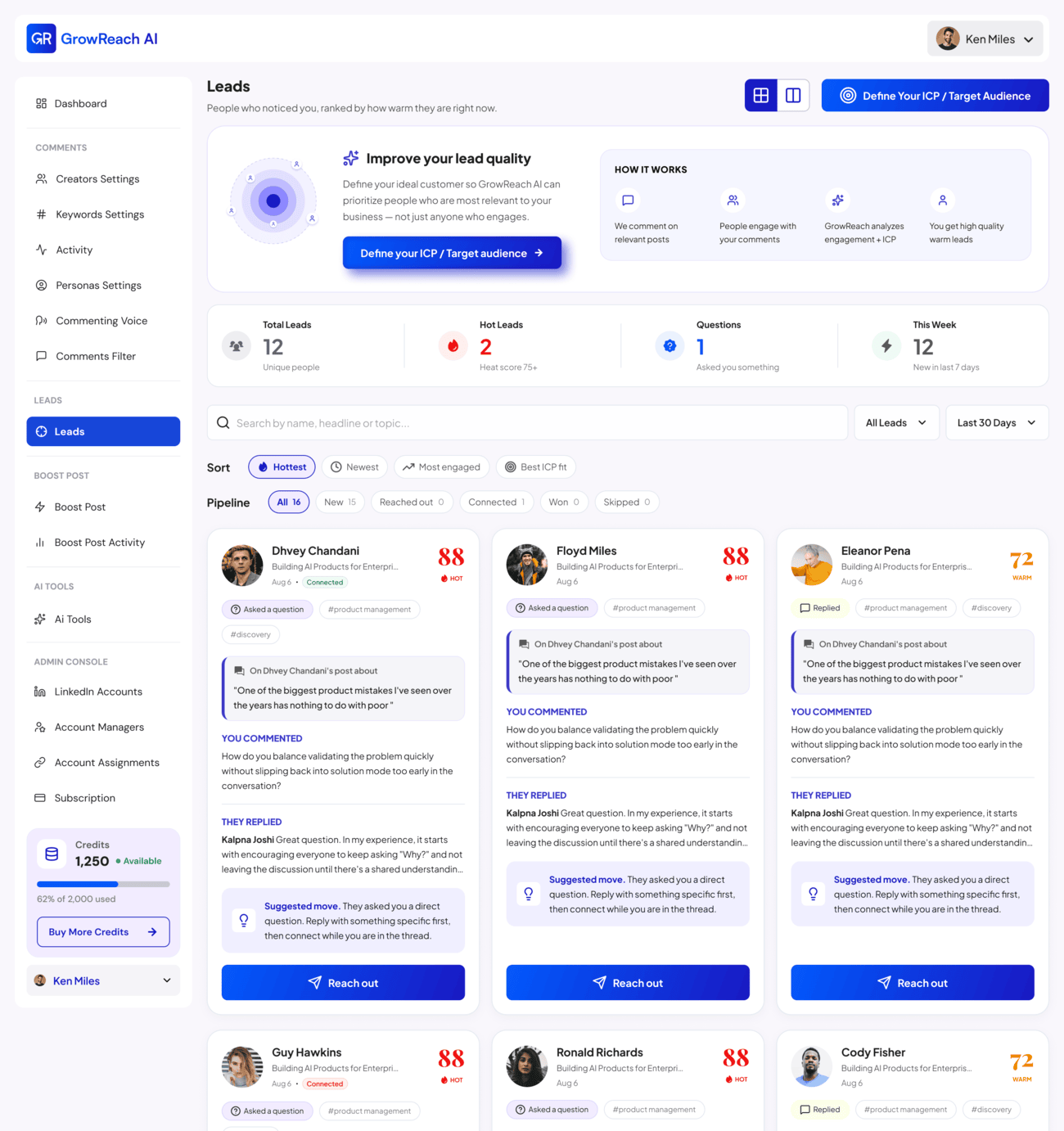
Every lead ranked HOT or WARM. Talk to the people ready to buy your product/service, first.
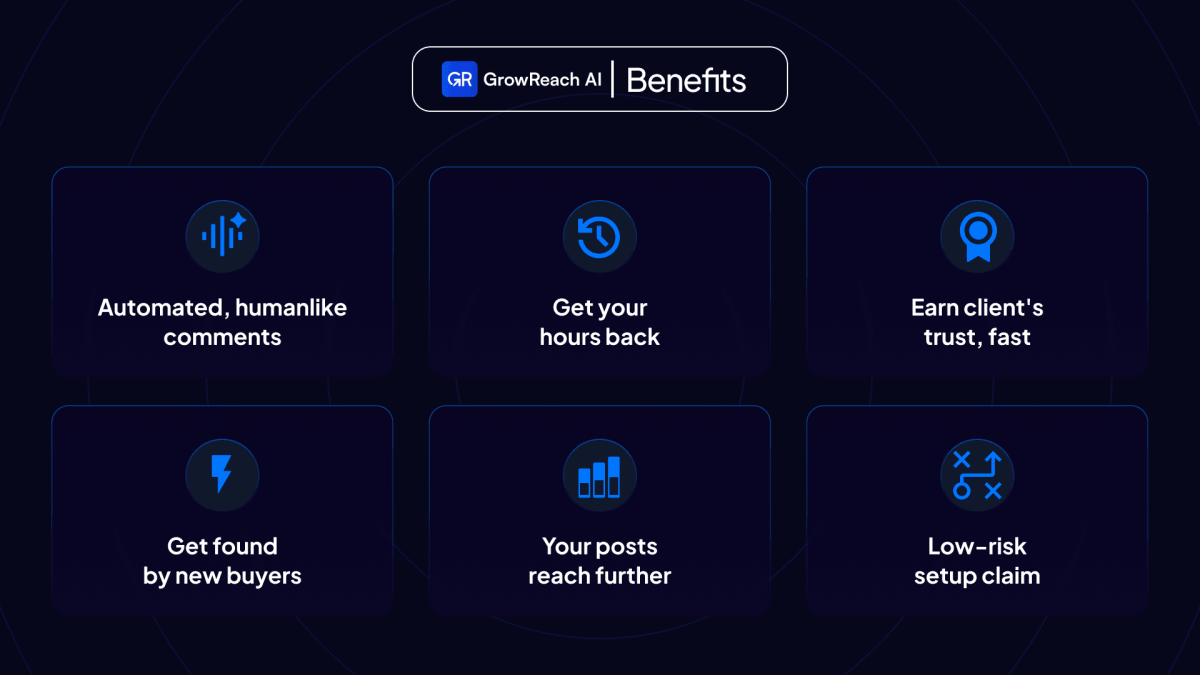
Get a first-hour boost from real people, the window that decides how far your post reaches.
When a lead heats up, a warm personal note is drafted for you using the full context.
Built from your real professional background and experience, so every comment reflects genuine expertise.
Fully automated in the cloud, or review-and-approve every comment before it goes live. Total control.
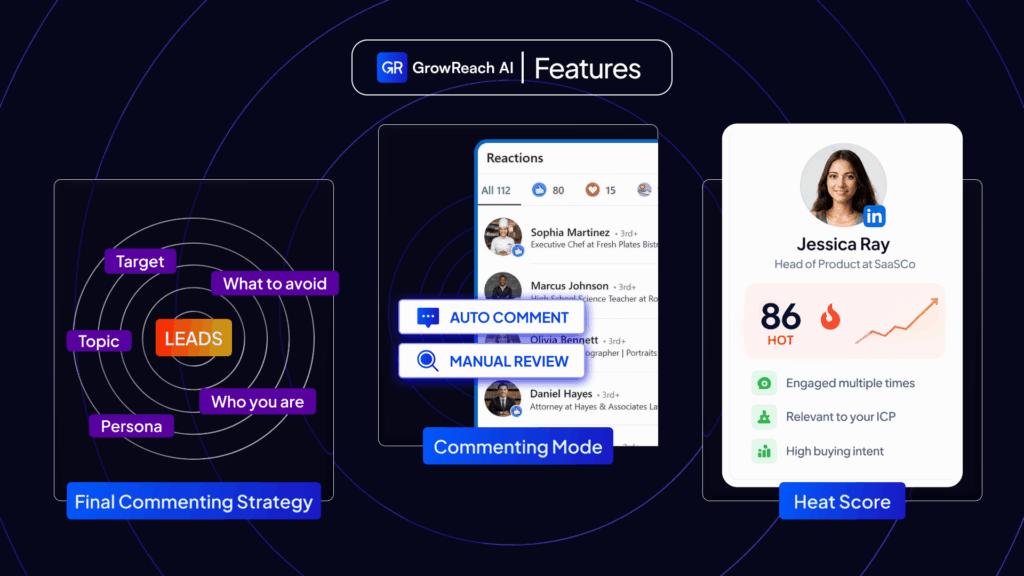
GrowReach comments on LinkedIn in your voice and turns real conversations into warm leads.
Setup GrowReach Agent in 3 simple steps:
1. Connect your Linkedin Account & Set up your 5 inputs: Connect your LinkedIn account and set your 5 inputs Target Users, Target Topics, Your Commenting Voice, Your AI Persona, Comment Filters. You can edit the voice brief auto-generated based on your Linkedin profile.
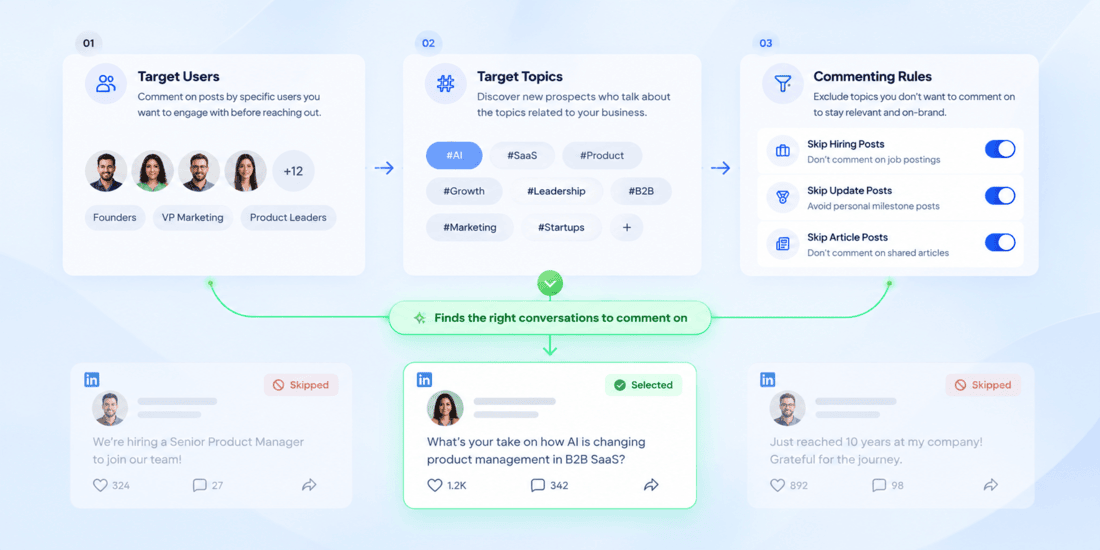
2. Choose your mode: Choose your execution mode Auto-Comment or Manual Review. GrowReach finds the right conversations and drafts your comments for you to review or posts automatically if set to auto.

3. Review & watch leads pipeline grow: Watch your pipeline grow. Review comments, check Hot Leads, send contextual connection requests every warm lead is tracked to the comment that won it.

Deal Terms
Features Included in All Plans
Here is the list of all features included all the plans (Modules):
Commenting Module:
Leads Module:
Post Boost Module:
Team Management Module:
Every AI action — generating a comment, analyzing a prospect, boosting a post — consumes credits. Manual actions don’t consume credits.
| Credit Usage | Credits Used | Estimated Range |
|---|---|---|
| Contextual comments posted on target Linkedin Posts | Depends on post content and comment length | 50-100 |
| Post Boost ( community likes & comments to boost your post ) | Depends on the post length and engagement done | 200-300 |
| Lead Connection Request Note | Depends on the context of last warm interaction | 50-100 |
| Reply To Prospect’s Comment | Depends on post content and reply comment length | 50-100 |
Note: Credit usage depends on the length of the content and the model being used to generate a hyper personalised and humane output. From time to time we upgrade the models as new open weight models come out and as result of our eval testing on the quality of output.
Our primary goal is that the comments sound so humane and drive leads for our customers.
So these estimated credit usage range can change as we use bigger models to generate better output
Credits that you spend per month on these completely depend on your usage
Do credits roll over?
No. Monthly credits renew each month and do not roll over, you get fresh credits each month for lifetime based on the Tier you purchased.
Our team built GrowReach to grow our own AI consulting agency. We used it daily, and our accounts never got a warning from LinkedIn. GrowReach has built-in checks and balances. Even if you wanted to, you can’t overdo LinkedIn’s safety limits. If you’re only using GrowReach, we guarantee your account won’t be flagged or warned.
We also recommending reading through our Safety page for responsible use: https://stagesite.growreach.app/safety/
No. GrowReach learns your style from your last 50 posts and comments. It reads the full post, understands context, and writes something useful. 67% of our comments get replies. CEOs and executives can’t tell the difference.
92% of users see a warm lead within 3 days. The first comment is generated in 90 seconds. If you don’t get a lead in the 14-Day Free Trial, don’t pay.
Yes. Choose Manual Review mode and approve every comment before it goes live. Or choose Auto-Comment and let GrowReach post comments that pass quality checks. Your call.
Yes. Team Management lets you manage 20+ LinkedIn accounts from one dashboard. Each client gets their own Commenting Voice, AI Persona, and pipeline report. Client invite links let clients connect their own accounts securely.
Taplio is a content tool. It schedules posts. It doesn’t connect comments to leads. GrowReach is the only tool that tracks every comment to a warm lead, scores it with a Lead Score, and drafts connection requests with full conversation context.
Agency ($299) Agency+($499) tiers are built for agencies: 5–7 accounts, 3–5 seats, 45k–75k credits/month, and Team Management. Agency+ if you manage a lot of clients.
After purchasing you will get a unique redemption code within your Order Confirmation email. It will also contain Redemption Instructions. Simply follow the instructions to redeem your purchase.
Here’s an example Order screenshot for where to look.
REFUNDS – RocketHub offers a simple 30-day money-back guarantee from the date of purchase.
You can request a refund by:
a) Submitting a request from your My Account dashboard, or
b) Emailing [email protected] with your order details and product to refund.
Note the following:
SUPPORT – RocketHub is a marketplace and does not operate or manage the products sold.
After the refund window, all product-related questions must be directed to and handled by the deal partner. RocketHub does not provide ongoing product support or act as an intermediary.
A) Included Features
Features available at the time of purchase are included in your plan. Future features are generally included as long as they do not introduce significant ongoing costs (such as per-use, AI LLM, 3rd party API, infrastructure, or bandwidth expenses).
B) AI, Credits & Variable Costs
This product uses third-party AI models (text, image, and/or video), and costs may vary over time. Credit usage and generation limits may be adjusted based on underlying provider pricing, which is outside the partner’s control. Current credit usage is outlined in the plans and/or FAQ at the time of purchase.
C) Paid Add-ons
If new features introduce meaningful ongoing costs, partners may offer them as optional paid add-ons (one-time or recurring), often at discounted rates for lifetime deal customers. This helps ensure long-term sustainability of the product.
D) Plan Mapping & Changes
Lifetime deal plans are based on the partner’s current plan structure at the time of purchase. Partners may update plan names, pricing, or limits over time. Your LTD will continue to reflect the value and limits defined at purchase, but does not guarantee access to all future highest-tier offerings.
E) Feature Changes or Removal
Products evolve. Features may be improved, replaced, or removed entirely based on business needs. If a feature is removed, it will be removed for all users (not just LTD holders). Previously included features will not be converted into paid add-ons unless they are fundamentally reworked or replaced.
F) Fair Use & Limits
All plans are subject to reasonable usage limits to prevent abuse and ensure platform stability. This may include rate limits, throttling, or other safeguards.
G) Third-Party Integrations
Integrations and external services depend on third-party providers. Changes to those providers (pricing, APIs, or availability) may impact or remove certain integrations.
H) Long-Term Availability
Lifetime deals provide access for the lifetime of the product, not a guaranteed duration. If the company is acquired, pivots significantly, or shuts down, services may be discontinued.
Final Note to Buyers
We encourage you to make your purchase decision based on the product’s current capabilities and assume the roadmap, if any, is a possibility not a guarantee. If you have questions, please ask before purchasing.
At the time this deal was launched, RocketHub does not support changing or upgrading your plan after purchase. LTD’s purchased via RocketHub also currently doesn’t support combining or stacking purchase codes. We recommend purchasing the tier that your business can grow into.
Founded: December 2025
Headquarters: Singapore
Company Size: 1–10 employees
Product Stage: Startup
Financial Stage: Bootstrapped
Since 2020, our AI consulting and software development agency has helped founders build and launch products. Linkedin became our best channel to generate leads.
GrowReach started as an internal tool to solve our own problem. We used the same LinkedIn cold-outreach tools you use, ran sequences across multiple accounts, and saw frustratingly low conversion. We realised the problem wasn’t the tools. It was “cold” outreach itself.
Cold outreach is a numbers game: you message people who don’t know you and hope they respond.
In our quest to find a scalable way to build familiarity before reaching out, we built GrowReach agent that engages with prospects, gets us into the right conversations, builds relationships warming up prospects
We saw our conversions climb and realised other founders, consultants, and agencies could benefit from GrowReach Agent too. So turned our Our internal agent into a product that helps you generate warm leads on LinkedIn.
— Rahul & Puneet
Founders, GrowReach
2025 – Singapore
Since 2020, our AI consulting and software dev agency has helped founders build products and launch startups. Before that, Rahul led product team at some of the biggest technology startups across Southeast Asia, India and Middle East. While Puneet spent years at a publicly listed software consulting giant. With every shipped product we learned what it takes to build things people actually use.
GrowReach was built as an internal agent to solve our own problem. We generate leads for our own consulting business from LinkedIn. We’ve used the same cold-outreach tools that you’ve seen in the market. We’ve run the sequences on multiple accounts only to realise how low the conversion is. After trying multiple tools hoping the tool we use or our setup is the problem. We realised the tools weren’t the problem. Cold outreach was.
Cold outreach is a numbers game. You send, you hope, you get ignored.
The people you want to talk to don’t know you yet, so they don’t reply. We kept asking the same question: How can we make the arm before reaching out, how to build that familiarity with them before approaching them ?
We wanted to build an AI agent which would engage with our prospects, make sure we showed up in the right conversations, and initiated conversations with our prospects engaging them much before the outreach.
That became GrowReach. We built it for ourselves, use it every day, and watched our conversion rate climb. Then we realised other founders, consultants, and agencies had the same problem. So we turned it into a product to help you generate warm leads on Linkedin.
GrowReach was built as an internal agent to solve our own problem. We generate leads for our own consulting business from LinkedIn. We’ve used the same cold-outreach tools that you’ve seen in the market. We’ve run the sequences on multiple accounts only to realise how low the conversion is. After trying multiple tools hoping the tool we use or our setup is the problem. We realised the tools weren’t the problem. Cold outreach was.
Cold outreach is a numbers game. You send, you hope, you get ignored.
The people you want to talk to don’t know you yet, so they don’t reply. We kept asking the same question: How can we make the arm before reaching out, how to build that familiarity with them before approaching them ?
We wanted to build an AI agent which would engage with our prospects, make sure we showed up in the right conversations, and initiated conversations with our prospects engaging them much before the outreach.
That became GrowReach. We built it for ourselves, use it every day, and watched our conversion rate climb. Then we realised other founders, consultants, and agencies had the same problem. So we turned it into a product to help you generate warm leads on Linkedin.
There are no reviews yet.
Only logged in customers who have purchased this product may leave a review.


Got a Question? Ask here.
Does this tool work safely with other Linkedin automation tools like HeyReach or Flow AI? Thanks!
Thanks @Tom, Glad you asked this. Let’s me explain in as much detail as I can.
How GrowReach differ from other tools in the market ?
One of the leading reasons LinkedIn flags accounts is a low connection-request acceptance rate. Most cold-outreach tools exist to send requests left, right, and centre
Which is exactly what drives your acceptance rate down. When it stays low, LinkedIn reads you as someone spamming instead of genuinely connecting, and that’s what triggers restrictions. It’s a classic cold-outreach loop, and it’s the exact problem GrowReach solves.
Instead of blasting cold connection requests, GrowReach engages with your prospects and warms them up first we build familiarity, so they know *you* before you reach out, and they’re far more likely to accept your request. That lifts your acceptance rate, and a healthy acceptance rate is one of the strongest signals LinkedIn uses to tell a legitimate networker from a spammer. So no matter which tool you use, safely automating lead generation on Linkedin depends on certain metrics that we have focused on while building GrowReach. Can’t say the same about other tools
Is GrowReach safe to use on its own ?
Absolutely. We use GrowReach ourselves to generate leads for our own AI consulting business, we dogfood our own tool before selling it to the public. Across all accounts connected on our platform, we haven’t seen even a warning or a temporary restriction in 7 months of generating warm leads.
Can GrowReach work with your other tools ?
Yes. GrowReach is designed to fit into your existing outreach workflow if you are using a tool already. We work on the pre-outreach and outreach level and since we let you choose whom to reach out to and don’t automatically reach out we don’t conflict with other automation tools you’re running. So you can use us alongside HeyReach and others
That said, I’d recommend not stacking too many tools: we don’t know how other tools manage your account, whether they keep a isolated and clean environment for it (dedicated IPs, no DNS leaks), and when something goes wrong, the more tools in play, the harder it is to debug what caused it. We’ve invested a lot in making sure no GrowReach customer face 0 LinkedIn issues, but we can’t say the same for every tool out there.
Note: Here’s the thing about us: your account safety comes first.
Your account is whats used to execute no matter whichever tool you use. So getting you leads is our second priority; keeping your account safe is our first. It’s not just about getting you leads, it’s about getting you leads *Safely*.
That’s why we have thresholds and limits are baked into how much GrowReach lets your account comment. Even if you wanted to go overboard and flirt around the spammy territory, GrowReach system won’t let you. We’d rather be safe than chase volume. Our AI constantly assesses your account’s quality and keeps you under the safe limit, so your account doesn’t even get flagged.
is there way to use this tool without connecting the linkedin account, like how reply daddy does ?
Thanks for asking this question Reloops.
This question can’t be applied to Linkedin as a platform, because LinkedIn and Reddit are fundamentally different platforms. Let me explain in detail.
Why ReplyDaddy works without asking your reddit account ?
ReplyDaddy operates on Reddit, which is inherently open platform. Reddit posts are indexed by search engines, you can read page after page of content and 100s of posts without reddit even nudging you repeatedly to login, and the platform is built around anonymity, it never forces you to log in to consume.
That’s why a listening tool like ReplyDaddy (or a similar multi-platform social listening/monitoring tool like TrendFynd (also sold on RocketHub) can pull public data with no account connection at all from Reddit and Twitter.
Why no tool can do this on LinkedIn without using an account ?
LinkedIn is a walled platform. After a first profile visit or post read sometimes just on your second action it blocks you and forces a login. The high-value business-data (who’s active, which posts are gaining traction, who’s engaging) sits behind that wall and only very few posts are indexed by Google unlike Reddit content is. So a LinkedIn tool simply cannot get quality signals without using a logged-in account. That’s a fundamental platform constraint, not a product choice we made.
There’s also a category difference.
1) ReplyDaddy is a social-listening tool – it monitors keywords and conversations, which needs only read access.
VS
2) GrowReach is a lead-generation tool – it doesn’t just find mentions, it identifies prospects and posts worth commenting on, then comments for you (or holds each comment for your manual approval).
That engagement layer, where GrowReach makes you appear consistently in key conversation that get you noticed by your prospects. This engagement which can only happen from one of the Linkedin accounts you connect (can be any and not yours ) is what turns LinkedIn activity into leads.
The good news: you stay in control. GrowReach can run fully automated, or you can set it to manual review so nothing goes out until you approve it.
Also I’ve detailed out how GrowReach is built to not just get you leads, but get you leads safely.
Can we set up residential proxies?
1. For each connected LinkedIn account, what proxy/IP infrastructure is used when GrowReach performs automated comments?
2. Your website mentions dedicated residential IPs. Are these genuine residential/home-user connections rather than datacenter or ISP/static proxies?
3. Can I choose Portugal and a specific Portuguese region/city?
4. Can I bring my own Portuguese residential proxy?
Hey Suparanova, thanks for the great questions. Answering all of them below
1. For each connected LinkedIn account, what proxy/IP infrastructure is used when GrowReach performs automated comments?
While GrowReach is a warm lead generation tool, that’s not actually our 1st priority. Our 1st priority is to keep your account safe and getting you leads is our second priority. We uphold the first priority with the utmost importance and for that we use a dedicated proxy provider. We use strictly static residential proxies so that the sanctity of the session is maintained and the account is not jumping from one IP to the other
2. Your website mentions dedicated residential IPs. Are these genuine residential/home-user connections rather than datacenter or ISP/static proxies?
As written these are genuine residential IPs. They are specifically ISP IPs and we ensure that these are not data center IPs, which are easily flagged. These are purely residential ISP IPs rented by the network connection owners.
3. Can I choose Portugal and a specific Portuguese region/city?
Yes you can choose Portugal as a country but not a specific city in Portugal at the moment.
4. Can I bring my own Portuguese residential proxy?
We manage the proxy network in our infrastructure because our whole product relies on that and we buy them in bulk (so we can ensure that it’s only us who are dedicatedly using that IP). We don’t even share IPs among two accounts. That’s how our current infrastructure is and we usually don’t get this request from a customer asking if they can bring their own residential proxy. We also didn’t want to take a chance because we don’t know if their residential proxy is shared with other people who are doing other activities. To keep it safe we manage the residential proxy infrastructure ourselves.
I can see from your questions that you have been doing this for a while so you understand the way things need to be done so that your Linkedin account can be safely automated.
We’d love to have you as a customer and then take your inputs to shape the product for power users like you